Free · open source (Apache-2.0) · runs on your own computer
One command, and a computer is ready to code with AI.
Your rules, skills and memory come along to every machine, and every session is on one page, also on your phone.
curl -fsSL https://raw.githubusercontent.com/allswebtech/hoprig/main/install.sh | shRuns on Linux. On macOS the tests run, but installs and what is new since 0.2 are not run on a real Mac yet. Windows is not ready. Just looking? hoprig demo opens the dashboard with sample data, no account needed.
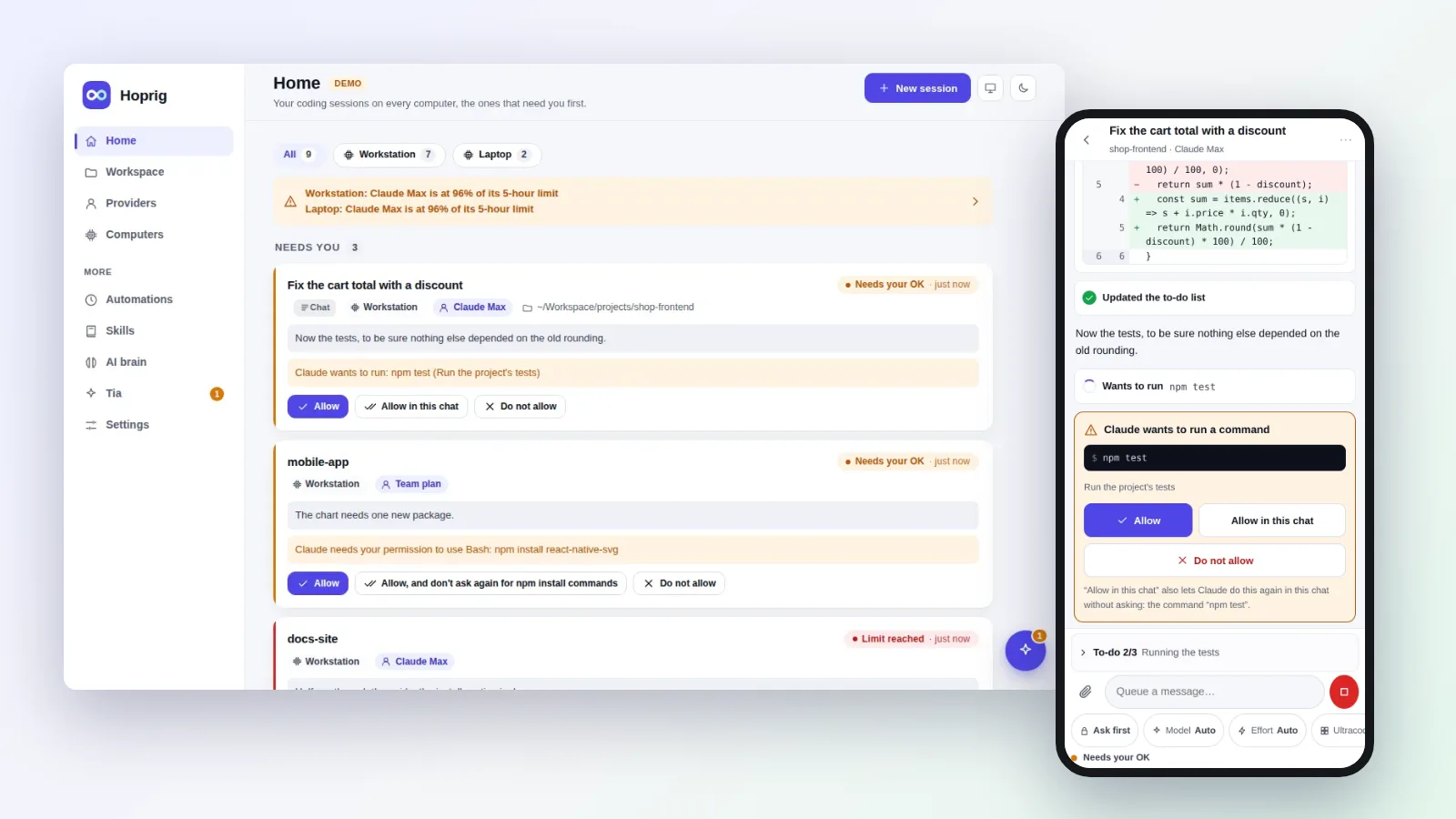
What does Hoprig do?
Each of these exists somewhere on its own. Hoprig puts the three together, on your own computers.
1. It sets up the computer
One line installs Hoprig. It then checks what the computer has and installs what is missing: git, Node.js, Python, GitHub's command line and sign-in, Claude Code, your projects and skills that fit them. It asks a few questions, each once, and leaves alone what is already there. Run on Linux; on macOS these installs were checked, not run yet.
2. One workspace that comes back from git
Your projects, their rules and an AI memory per project live in git. On the next computer one command brings all of it back where it belongs, and your coding tools read the same rules, skills and memory.
3. A session goes on at a usage limit
Subscriptions, API keys and gateways are all "providers". When one reaches its limit, one tap continues the same conversation on another provider or another Claude account of yours. Auto mode can do it for you, in Claude Code.
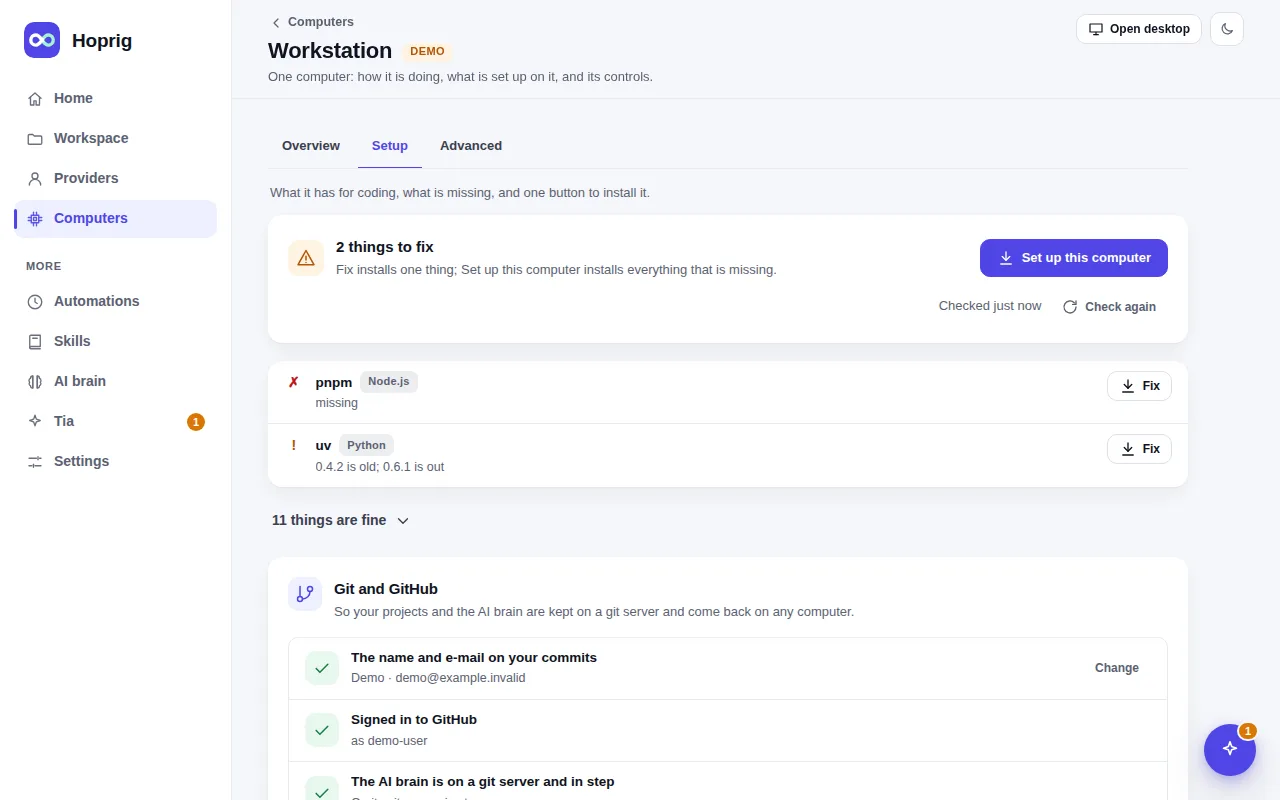
A computer's Setup page: what it has, what is missing, one button to install it.
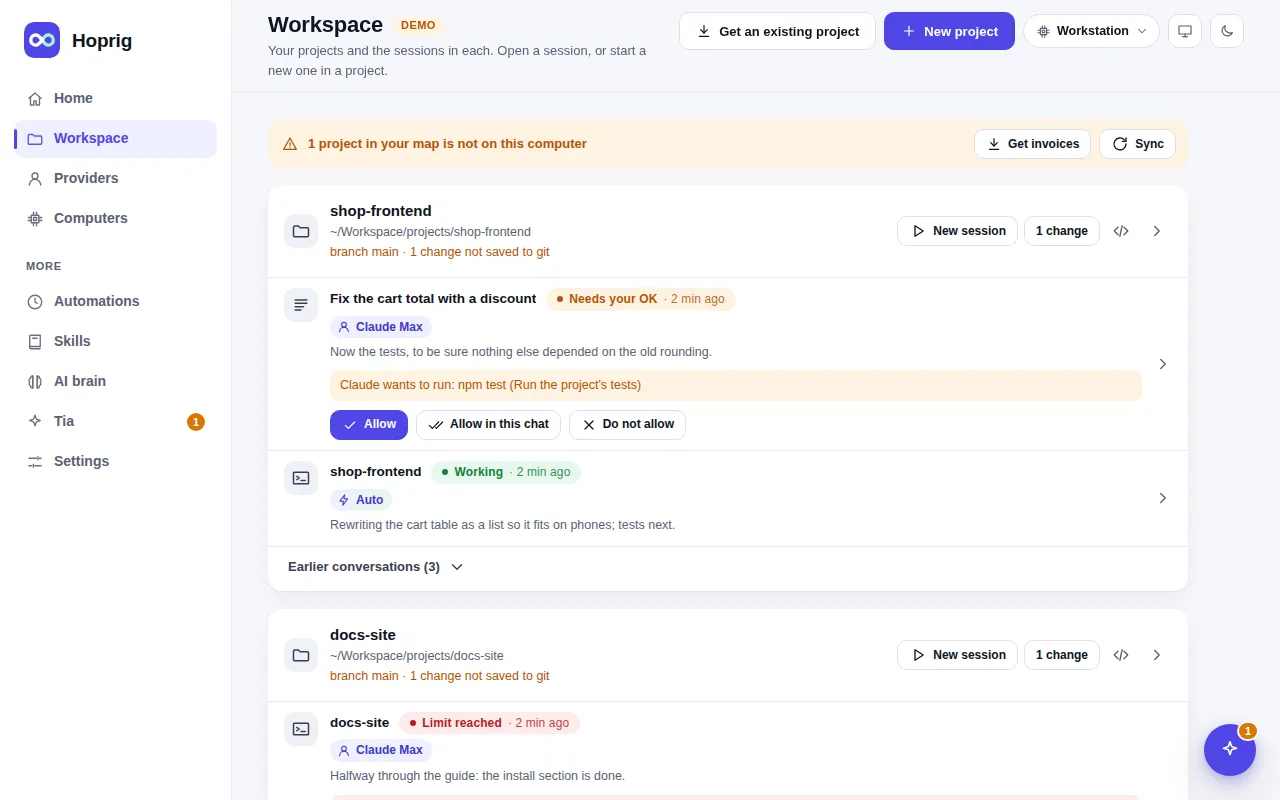
The Workspace page: every project, with its sessions under it.
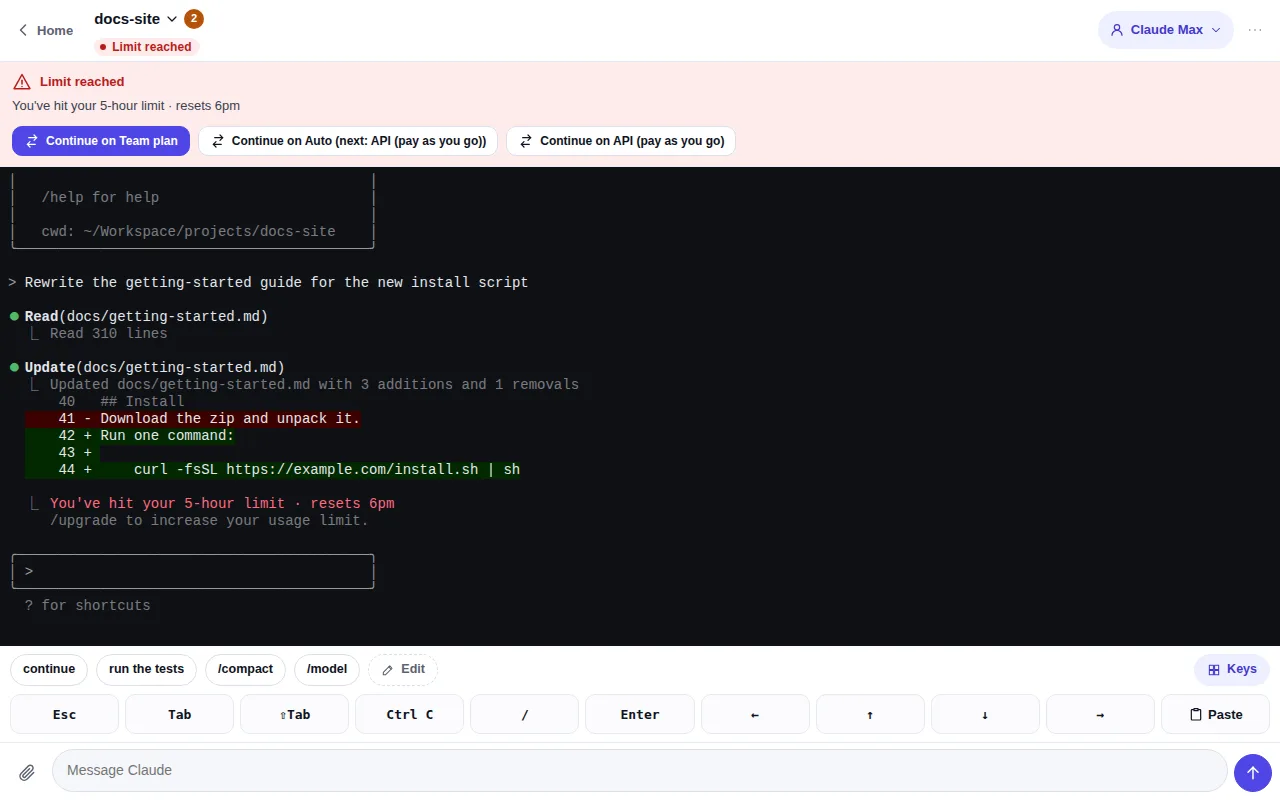
At a usage limit: the other providers as buttons, to go on with the same conversation.
Who it is for
Find your case. Each page says who it is for, what Hoprig does step by step with the real commands, what you need, and what it does not do.
Not a developer
I am not a developer. How do I start building with AI on my own computer?
The set-up is the wall. Hoprig installs and checks everything, then you build in a chat.
Anyone with an AI-built project
My AI-built project became a mess after a few weeks. How do I keep it in order?
A structure from day one: a project's own rules and memory, one AI brain, skills and checks.
Coding from a phone
How do I code on my own PC from my phone with Claude Code?
The dashboard from anywhere, no server: a chat per project, the OKs and the real terminal.
Two or more computers
How do I use Claude Code on two computers with the same skills, rules and memory?
Home PC, office PC, laptop: the same projects, rules, skills and memory through git, every session on one page.
New, formatted or lost computer
How do I get my whole AI coding setup back on a new, formatted or lost computer?
Install, sign in to git, and everything comes back where it was.
Heavy users
I hit the Claude Code usage limit in the middle of my work. How do I keep going?
The same session goes on with another provider or account, by one tap or by itself.
API key and gateway users
How do I use Claude Code from my phone with an API key or a gateway?
Where the coding tool's own remote features stop working, the dashboard still does.
Freelancers and agencies
How do I keep many client projects apart when I code with AI?
One folder, one set of rules and one provider per client project; fetch it when work starts, put it away after.
A spare PC or a small server
How do I turn a spare PC or a small server into an always-on coding machine?
Your always-on coding machine: sessions keep running, and you reach them from any browser.
Team leads
How do I set up every machine the same way for AI coding?
Every machine set up the same, from one recipe and one AI brain, all on one page.
Long-running work
How do I let AI coding work go on while I sleep?
Tasks in a queue, schedules and Auto mode, and the results waiting in the chats in the morning.
Code that has to last
How do I make AI-built code ready for real use, not just "it runs"?
Working rules, checked skills and proof before "done", for code that has to hold up.
An AI team Coming
Coming: can I run an AI team under one assistant?
An AI team under one assistant, for development, research, content and posts, with you approving what goes out.
How it works
- Install. Paste one line into a terminal. It adds what is missing, after a few questions, each asked once, and ends with a QR code.
- Open the dashboard. Scan the QR code with your phone, or open it on the computer. Until everything is set up, Home shows a Get started list.
- Code in a chat. Pick a project and start a chat with Claude Code or OpenCode. You see each change and press Allow or Do not allow, at your desk or on your phone.
curl -fsSL https://raw.githubusercontent.com/allswebtech/hoprig/main/install.sh | shCompared, honestly
Other tools do some of this, and some of it better. Checked on 17 Nov 2026 from each tool's own pages.
| Hoprig | Claude Code's own apps | Happy | tmux, SSH and a VPN | |
|---|---|---|---|---|
| Sets up a fresh computer for coding | Yes on Linux; macOS partly | No | No | No |
| Rules, skills and project memory come back on a new computer | Yes, from git | Partly: project memory stays on one computer | No | No |
| A session goes on with another provider or account at a limit | Yes | No: it waits for the reset, or you pay for extra usage | No | No |
| From a phone | Yes, in the browser | Yes, an app | Yes, an app | Yes, in a terminal app |
| From a phone with an API key or a gateway | Yes | No | Not checked | Yes |
| Goes on with your computer switched off | No | Yes, cloud sessions | No | No |
| Windows | Not yet | Yes | Not checked | Depends on the tools |
Questions and answers
Is Hoprig free?
Yes. It is open source under the Apache License 2.0: you may use, change and share the code. It runs on your own computers and has no server of its own, no account and no plan. What can cost money is the provider you choose: a Claude plan, an API key or a gateway.
Do I need a server?
No. One computer is enough. Your phone reaches it on the same Wi-Fi, or from anywhere with the public link, a free Cloudflare tunnel that Hoprig turns on with one switch. A server helps only as an always-on hub for several computers.
Does it work on Windows?
Not yet. Its code is written, but the tests do not pass on Windows. Linux is run and tested. On macOS the tests run on every change and the providers and Auto mode were run there, but the setup's installs were only checked read-only, and what is new since 0.2 (the chat, the editor, the desktop, Work, the workspace's groups) has not been run on a real Mac.
Does it change Claude Code?
No. Hoprig runs the official, unmodified Claude Code and OpenCode, and keeps your accounts on your own computers.
Is it allowed to go on with a second Claude account?
Anthropic's documentation covers several accounts of your own on one machine, API keys and gateways. Whether going on past a limit on a second subscription of your own is acceptable is not clearly settled by the terms. The surest setup is one subscription, then an API key. Is this allowed?
Is there a phone app?
No. The dashboard is a web page made to work on a phone: chats, OKs, terminals and the editor. Typing with a real phone's on-screen keyboard in the editor and the chat has not been proven yet.
Which coding tools does it run?
Claude Code, and OpenCode as a second one. OpenCode runs only on an API key or a gateway, never on a Claude subscription. Codex is not part of this version.
How ready is it?
Its tests run on Linux and macOS with Node.js 22, 24 and 26 on every change. What is new since 0.2 was run on Linux only, not on a real Mac, and the last checks of this version ran on stand-ins for the coding tools, not on real Claude Code or OpenCode. Everything that is not built or not proven yet is on one page: Not built, or not proven yet.
Start now
curl -fsSL https://raw.githubusercontent.com/allswebtech/hoprig/main/install.sh | shThen read how the install works, or find your use case.